
Quick answer: CNC laser cutting uses a computer-controlled laser beam to cut material along programmed paths. Fiber lasers are widely used for metal, while CO2 lasers process many non-metal materials. Material, thickness, gas, focus, and machine settings determine the result.
CNC laser cutting connects digital design with automated manufacturing. It is used for sheet metal brackets, machine enclosures, acrylic panels, signage, and prototype components that need accurate, repeatable profiles.
This guide covers the cutting process, machine components, laser technologies, material compatibility, design preparation, operating parameters, costs, safety, and common production problems. It is written for engineers, manufacturers, product developers, and workshop owners.
What Is CNC Laser Cutting?
CNC laser cutting is an automated manufacturing process that uses a focused laser beam to cut material along a digitally programmed path. The process combines computer-controlled movement with concentrated laser energy.
CNC stands for Computer Numerical Control. It describes a method of controlling machine movement and operations through programmed instructions.
Laser cutting describes the material-processing method. It uses concentrated light energy to melt, vaporize, or otherwise separate material along a required profile.
A CNC laser cutting machine combines both technologies. Software prepares the cutting paths, the controller manages motion, and the laser system performs the material-processing operation.
CNC vs. Laser Cutting: What Is the Difference?
CNC and laser cutting are not competing technologies. CNC describes how a machine is controlled, while laser cutting describes how material is processed.
- CNC: A method of controlling machine operations through programmed instructions.
- Laser cutting: A process that uses concentrated laser energy to separate material.
- CNC laser cutting: A laser cutting operation controlled through a CNC system.
A CNC machine does not necessarily use a laser. CNC milling machines, routers, lathes, and plasma cutters also use computer-controlled movements.
Similarly, a laser source does not automatically make a machine CNC-controlled. The complete machine needs a suitable motion and control system to follow programmed paths.
Where Is CNC Laser Cutting Used?
CNC laser cutting is used in industrial manufacturing, product development, and custom fabrication. Applications range from simple sheet profiles to detailed mechanical and electronic components.
- Sheet metal brackets, mounting plates, and machine covers.
- Electrical and electronic enclosures and control panels.
- Automotive panels, selected aerospace components, and machinery parts.
- Acrylic displays, signage, decorative panels, and architectural products.
- Prototype components and custom sheet metal parts.
How Does CNC Laser Cutting Work?
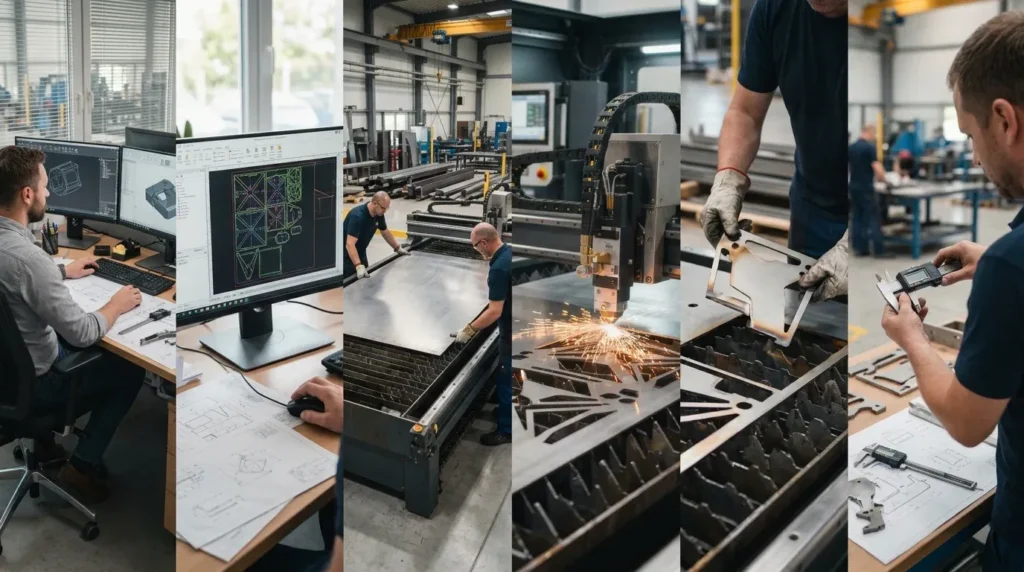
The CNC laser cutting process connects digital design, software preparation, machine setup, and automated cutting. Although machines use different controllers, most follow a similar production sequence.
1. Create the CAD Design
The first step is creating a digital drawing of the component. Engineers use Computer-Aided Design software to define dimensions, holes, curves, profiles, and other geometric features.
Common applications include AutoCAD, SolidWorks, CorelDRAW, Adobe Illustrator, and other compatible CAD or vector tools. The correct application depends on the component and machine workflow.
For engineering parts, the drawing should use accurate dimensions and clearly defined units. Designers should also check open contours, overlapping lines, duplicate geometry, and incorrect scale.
2. Export the Design File
The completed drawing must be exported into a format supported by the laser control software. The correct format depends on the controller, software, and type of design.
- DXF: Frequently used for CAD drawings and engineering geometry.
- SVG: Commonly used for vector graphics and decorative designs.
- AI: Used for vector artwork created in Adobe Illustrator, when supported.
- Other formats: Availability depends on the machine controller and software.
DXF is often suitable for engineering drawings, while SVG is useful for vector artwork. Before exporting, confirm drawing scale, units, line types, and geometry.
3. Prepare Toolpaths and Nesting
After importing the drawing, the operator prepares the cutting paths. Laser control or CAM software helps define cutting order, speed, laser power, piercing operations, and process settings.
The software may apply kerf compensation to account for material removed by the laser. This is particularly important for slots, mating parts, and components that require accurate dimensions.
Nesting arranges multiple parts within a sheet to improve material utilization. Good nesting can reduce scrap, shorten production time, and lower material costs.
The cutting sequence also matters. A poorly planned sequence can allow parts to move, create concentrated heat, or interfere with nearby components during production.
4. Configure the CNC Laser Cutting Machine
Before production, the operator prepares the machine and workpiece. This includes confirming the material, positioning the sheet, and checking the equipment against its operating requirements.
- Confirm the material type, grade, and thickness.
- Position the sheet securely on the cutting bed.
- Check the cutting nozzle and protective optics.
- Set the focal position and approved assist gas.
- Check cooling, air supply, and extraction systems.
- Establish the work origin and machine coordinates.
- Load validated material-specific cutting settings.
Machine settings should come from validated material tables or manufacturer recommendations. A setting that works on one machine may not produce the same result on another.
5. Execute the Laser Cutting Operation
Once the machine is prepared, the CNC controller executes the programmed cutting path. The laser source generates the beam, and the optical system directs it toward the cutting head, where the focusing lens concentrates its energy.
The concentrated energy heats the material until it melts or vaporizes. Assist gas helps remove material from the kerf while the motion system moves the cutting head or workpiece along the programmed path.
The result is a cut profile that follows the geometry defined in the original design. Its accuracy and edge quality depend on the machine setup, material, and process parameters.
6. Inspect and Finish the Component
After cutting, the operator removes the finished parts and checks them against the engineering drawing. Inspection may include measuring external dimensions, hole positions, slot widths, and other critical features.
Depending on the application, additional operations may involve removing dross or burrs, cleaning cut edges, removing protective films, and preparing parts for assembly.
Some components may also require surface finishing, welding, bending, or further machining. A part that looks clean can still contain dimensional errors, so appearance and measurements should both be checked.
Main Components of a CNC Laser Cutting Machine
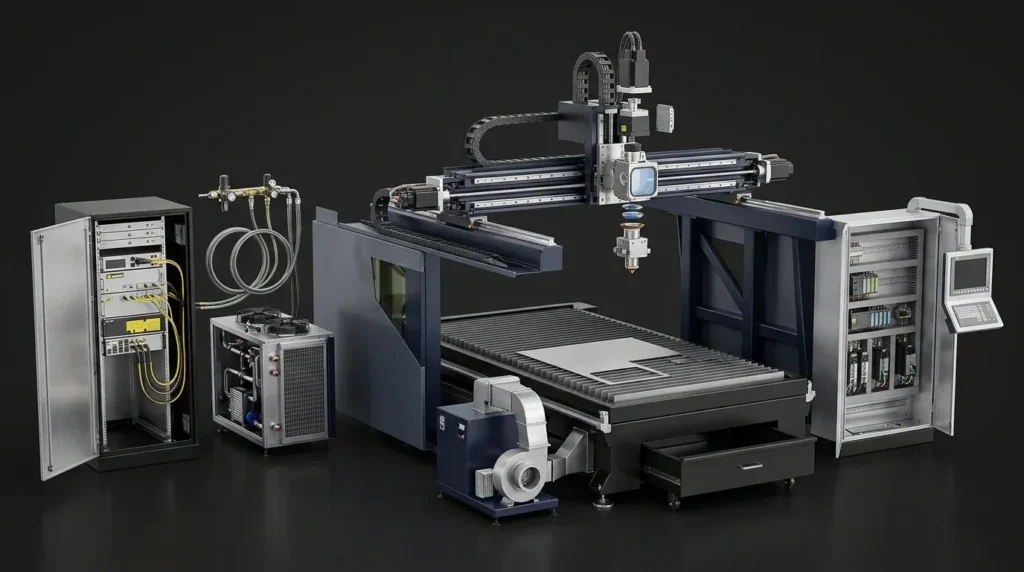
A CNC laser cutting machine combines optical, mechanical, electrical, pneumatic, and control systems. Understanding these subsystems helps manufacturers evaluate equipment and identify potential production problems.
1. Laser Source
The laser source generates the beam used to process material. Different machines use fiber, CO2, diode, or Nd:YAG laser sources, depending on their intended applications.
The source affects wavelength, available power, efficiency, and material compatibility. Fiber systems are widely used for sheet metal, while CO2 systems commonly process suitable non-metal materials.
2. Laser Cutting Head
The cutting head directs the laser beam toward the workpiece. A typical industrial head contains a focusing lens, protective optical window, cutting nozzle, assist-gas passage, and height-sensing components.
The head maintains the required distance and alignment relative to the material surface. Damaged optics, a worn nozzle, or unsuitable focal positioning can reduce cutting quality.
3. Optical System
The optical system guides and focuses the laser beam. Depending on the technology, it may use mirrors, optical fibers, and focusing lenses.
Contaminated or damaged optical components can reduce energy delivery and affect process stability. Inspection and cleaning must follow the machine manufacturer’s procedures.
4. CNC Controller and Motion System
The CNC controller interprets machine instructions and coordinates the cutting operation. It manages movement, positioning, acceleration, and communication with the laser control system.
The motion system may include servo motors, stepper motors, linear guides, ball screws, or rack-and-pinion drives. Industrial machines use configurations designed for repeatable movement.
5. Assist Gas System
Assist gas flows through the cutting nozzle and supports material removal. Oxygen, nitrogen, and compressed air are common choices in suitable applications.
Gas selection influences cutting speed, edge oxidation, dross formation, and downstream finishing requirements. The supply also needs appropriate pressure regulation and, where necessary, filtration or drying.
6. Cooling System
Laser sources and other machine components generate heat during operation. A cooling system, often using a water chiller, helps maintain the required operating temperature.
Cooling capacity, coolant specifications, and monitoring requirements depend on the laser source and machine configuration. Inadequate cooling can affect reliability and interrupt production.
7. Exhaust and Fume Extraction
Laser processing can produce smoke, dust, vapors, and airborne contaminants. A suitable extraction system removes these contaminants from the cutting enclosure or working area.
The extraction and filtration arrangement must be appropriate for the materials being processed. General-purpose ventilation should not be assumed to make every material safe.
Types of Laser Cutting Machines
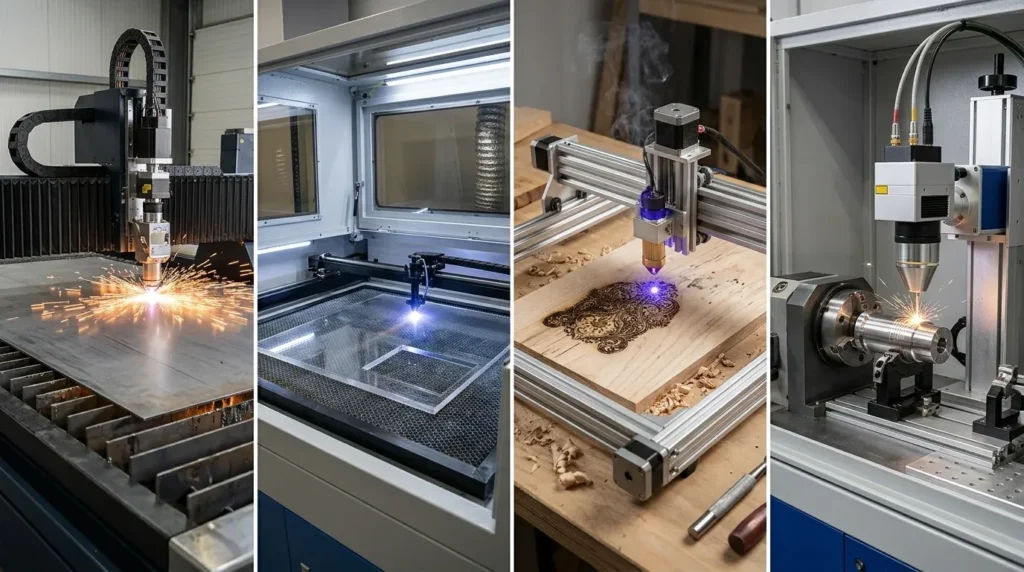
Laser cutting machines are commonly classified by their laser source and intended application. Fiber, CO2, and diode systems are widely available, while Nd:YAG lasers are used in specialized industrial processes.
1. Fiber Laser Cutting Machine
A fiber laser uses an optical fiber as its gain medium. Many industrial sources operate around 1070 nm, although exact wavelength specifications vary between manufacturers and laser models.
Fiber lasers are widely used for metal processing because they are suitable for mild steel, stainless steel, aluminum, brass, and copper when the equipment is designed for those materials.
Applications include sheet metal fabrication, machine components, automotive parts, industrial enclosures, and precision metal components.
Advantages: High efficiency in suitable metal-cutting applications, fiber beam delivery, relatively low routine optical maintenance, and compatibility with automated production.
Limitations: Industrial equipment can require significant investment. Reflective metals need suitable machine design, and cutting capability depends on power, material, thickness, and process settings.
2. CO2 Laser Cutting Machine
A CO2 laser uses a gas mixture containing carbon dioxide to generate laser energy. These systems typically operate at a wavelength of approximately 10.6 micrometers.
CO2 laser cutters commonly process suitable non-metal materials, including acrylic, plywood, MDF, paper, cardboard, leather, and selected fabrics. They are used for signage, displays, packaging, decorative products, model making, and prototyping.
Advantages: Suitable for many non-metal materials, supports cutting and engraving, and is available in desktop and industrial configurations.
Limitations: Optical alignment and maintenance are important. CO2 systems have different maintenance requirements from fiber systems and are not generally preferred for modern high-productivity sheet metal cutting.
3. Diode Laser Engraver
A diode laser uses semiconductor technology to generate laser energy. These systems are commonly available as compact desktop machines for engraving, marking, and selected thin-material cutting applications.
Typical uses include wood engraving, leather marking, paper processing, and small craft projects. Practical cutting ability depends on the diode module, material, power, and machine configuration.
Advantages: Compact designs, accessible entry-level equipment, and usefulness for engraving and small workshop projects.
Limitations: Limited cutting capability compared with industrial systems. Diode machines are not a replacement for industrial metal-cutting fiber lasers.
4. Nd:YAG Laser
Nd:YAG stands for Neodymium-doped Yttrium Aluminum Garnet. It is a solid-state laser technology used in specialized applications such as cutting, drilling, marking, and precision material processing.
Nd:YAG systems may operate in pulsed or continuous-wave configurations, depending on their design. They are not generally the first choice for ordinary workshop sheet metal cutting.
| Feature | Fiber Laser | CO2 Laser | Diode Laser | Nd:YAG Laser |
|---|---|---|---|---|
| Technology | Solid-state fiber | Gas laser | Semiconductor | Solid-state crystal |
| Typical wavelength | Around 1070 nm for many industrial sources | Around 10.6 µm | Varies by diode | Around 1064 nm |
| Common applications | Metal cutting | Non-metal cutting | Engraving and light cutting | Specialized processing |
| Sheet metal suitability | High | Application-dependent | Generally unsuitable for industrial metal cutting | Specialized |
| Acrylic | Generally unsuitable for clear acrylic cutting | Commonly used | Depends on material and system | Specialized |
| Wood | Not typical | Commonly used | Commonly used | Specialized |
The correct machine depends on materials, thickness, production volume, required finish, budget, and manufacturer specifications. Laser power alone is not enough to determine which machine is best.
Laser Cutting Methods and Working Principles
Different laser cutting methods use different interactions between laser energy, material, and assist gas. The method depends on material properties, thickness, machine capability, and the required cut quality.
1. Vaporization Cutting
Vaporization cutting heats material until it changes into vapor. The vapor and process gases are removed from the cutting region, creating a narrow separation path.
This approach is used in selected precision and thin-material applications. Its suitability depends on the material’s response to concentrated laser energy and the equipment being used.
2. Melt-and-Blow or Fusion Cutting
Fusion cutting melts the material using laser energy. An inert assist gas, commonly nitrogen in suitable metal applications, removes the molten material from the kerf.
This method is useful when low oxidation at the cut edge is important. It is commonly associated with stainless steel processing and other applications requiring clean cut surfaces.
3. Reactive or Oxygen Cutting
Oxygen cutting uses a chemical reaction between oxygen and heated material. The reaction produces additional heat, supporting the cutting process.
It is commonly used for suitable carbon-steel applications. The resulting edge may contain an oxide layer, which matters when parts require welding, painting, or other finishing operations.
4. Thermal Stress Cracking
Thermal stress cracking uses localized heating to create controlled stresses in brittle materials. These stresses help guide a separation line through the material.
It is a specialized process rather than a general-purpose method for ordinary sheet metal fabrication. Material behaviour and process control are important to achieving the intended result.
Materials Used in CNC Laser Cutting
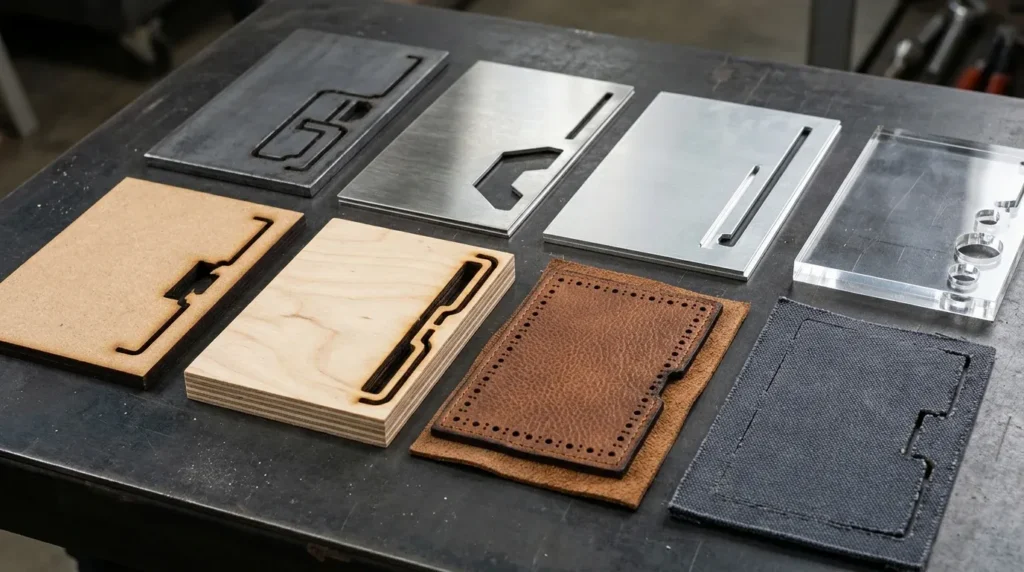
Material compatibility is one of the most important considerations when selecting a laser cutting machine. Wavelength, power, material composition, thickness, and machine design all influence whether a material can be processed successfully.
Metal Materials
Mild Steel and Carbon Steel: Industrial fiber lasers are widely used to cut mild and carbon steel sheets. Oxygen may support reactive cutting, while nitrogen may be selected when a low-oxidation edge is required.
The best option depends on thickness, cutting speed, edge appearance, and downstream finishing. Manufacturers should use validated process settings rather than assuming one gas is suitable for every job.
Stainless Steel: Fiber lasers are commonly used for stainless steel sheet cutting. Nitrogen is frequently selected when a clean, low-oxidation edge is required.
Gas purity and process settings can influence the final appearance. The required edge condition should be agreed with the manufacturer before production.
Aluminum: Aluminum can be processed using suitable fiber laser equipment. Its reflectivity and thermal conductivity require appropriate machine configuration and validated cutting parameters.
Material grade and thickness also affect process performance. Buyers should confirm the machine’s tested capacity for the specific aluminum alloy.
Brass and Copper: These materials can be processed using suitable fiber laser systems designed for reflective metals. Their optical and thermal properties make equipment suitability and operating precautions especially important.
The machine manufacturer should confirm supported materials and cutting conditions. Do not assume that every fiber laser system can process every reflective metal safely or effectively.
Non-Metal Materials
Acrylic (PMMA): CO2 lasers are commonly used to cut suitable acrylic sheets. The result depends on material grade, thickness, focus, speed, and machine settings.
Cast and extruded acrylic may produce different edge characteristics. The choice should reflect whether the project prioritizes edge appearance, dimensional accuracy, or production cost.
MDF: MDF can be processed using suitable CO2 laser equipment. Its resin and adhesive composition can influence smoke and emissions, so effective extraction and fire controls are essential.
Material thickness and density also affect cutting results. Operators should use approved material specifications and manufacturer-recommended settings.
Plywood: Laser cutting is used for plywood models, decorative products, enclosures, and prototypes. Different plywood grades contain different adhesives and internal layers.
These differences can affect cut consistency and emissions. Before processing, identify the grade and confirm that its composition is approved for the machine.
Leather and Fabric: CO2 lasers can cut or engrave many suitable leather and fabric materials. Material composition must be checked before processing, particularly for artificial leather.
Some products contain coatings, adhesives, or polymers that are unsuitable for laser processing. Never assume that a material is safe based only on its appearance.
Coroplast: Coroplast is commonly associated with corrugated polypropylene sheet. It can melt, deform, and present fire hazards during laser processing.
Do not assume that it is safe to cut. Confirm the exact material composition and obtain approval from the material manufacturer and equipment supplier before considering laser processing.
Important – PVC and Vinyl: PVC and vinyl must not be laser cut. Processing these materials can release hazardous corrosive gases and damage machine components.
Other plastics can also produce hazardous fumes or create fire risks. Always identify the material and consult its Safety Data Sheet (SDS), equipment guidance, and approved material list before processing.
| Material | Commonly used technology | Important consideration |
|---|---|---|
| Mild steel | Fiber | Assist gas, thickness, and edge finish |
| Stainless steel | Fiber | Oxidation and nitrogen purity |
| Aluminum | Fiber | Reflectivity and thermal conductivity |
| Brass | Suitable fiber systems | Reflective-metal precautions |
| Copper | Suitable fiber systems | Reflectivity and heat transfer |
| Acrylic | CO2 | Grade, thickness, and edge quality |
| MDF | CO2 | Emissions and fire risk |
| Plywood | CO2 | Adhesive and material composition |
| Leather | CO2 | Exact composition and coatings |
| Fabric | CO2 | Combustibility and fiber composition |
| Coroplast | Do not assume suitability | Manufacturer approval and fire risk |
Important Parameters That Affect Laser Cutting Quality
A suitable machine does not automatically produce accurate parts. Cutting quality depends on coordinated process settings, consistent material conditions, and the condition of machine components.
1. Laser Power
Laser power is measured in watts or kilowatts. Industrial fiber laser machines may be available in configurations such as 1000 W, 3000 W, and 6000 W.
Higher power can improve cutting capability or productivity in suitable applications. However, it does not automatically guarantee a better edge or greater dimensional accuracy.
Power must be considered alongside material, thickness, focus, cutting speed, and assist gas. The required settings should come from validated cutting data.
2. Cutting Speed and Feed Rate
Cutting speed describes how quickly the cutting head moves along the programmed path. It affects how much energy reaches each section of material.
If speed is too high, the laser may not complete the cut. If it is too low, excessive heat can cause rough edges, wider kerfs, burning, or distortion.
3. Focal Length and Beam Focus
The focusing lens concentrates the laser beam onto the workpiece. Focal length describes an optical property of the lens, while focus position describes where the beam is concentrated relative to the material.
These terms are related but not interchangeable. Incorrect focus can produce incomplete cuts, inconsistent kerf width, and poor edge quality.
4. Kerf Width
Kerf is the width of material removed during cutting. It depends on beam characteristics, focus, power, speed, material, and process conditions.
Kerf compensation adjusts the toolpath to account for removed material. This is especially important for slots, press-fit parts, and components that must fit together.
A slot drawn at exactly the same width as a mating component may become too large after cutting. The actual result depends on the kerf and direction of compensation.
Do not use one universal kerf value for every machine. Measure test cuts using the actual material and production settings.
5. Assist Gas Pressure and Purity
Assist gas removes molten material from the kerf and influences oxidation and edge quality. Incorrect gas selection, pressure, or purity can contribute to dross, rough edges, or incomplete cuts.
Gas settings should follow validated machine and material recommendations. The supply system may also require filtration and drying to prevent contamination or moisture-related problems.
6. Heat-Affected Zone (HAZ)
The heat-affected zone is the region around a cut that experiences thermal changes. Laser cutting concentrates heat in a relatively small area, but the material can still change near the edge.
Heat input, material properties, cutting speed, and process stability influence the result. These factors matter when parts have strict material or dimensional requirements.
7. Nozzle Condition and Stand-Off Distance
The cutting nozzle directs assist gas toward the cutting region. A damaged, dirty, or incorrectly selected nozzle can affect gas flow and process stability.
The distance between the nozzle and material also matters. Height control and stand-off settings should follow the equipment manufacturer’s specifications.
Assist Gases Used in CNC Laser Cutting
Assist gas helps remove molten material and influences the finished edge, cutting stability, and operating cost. The most common choices are oxygen, nitrogen, and compressed air.
Oxygen (O₂)
Oxygen is commonly used for reactive cutting of suitable carbon steels. It reacts with heated metal and produces additional heat, supporting the cutting process.
The cut edge may become oxidized. This can matter when the component requires a clean surface for painting, welding, or further processing.
Nitrogen (N₂)
Nitrogen is an inert assist gas used in fusion cutting. It helps eject molten material without supporting the same oxidation reaction as oxygen.
It is commonly selected for stainless steel and other suitable applications where a low-oxidation edge is important. Gas purity and pressure must match process requirements.
Compressed Air
Compressed air can be a cost-effective option for selected applications. Suitability depends on air pressure, moisture, oil contamination, material thickness, and required edge quality.
A properly designed air supply system may require filtration, drying, and pressure regulation. Contaminated air can affect cutting quality and machine components.
| Gas | Common application | Main benefit | Main consideration |
|---|---|---|---|
| Oxygen | Suitable carbon steel | Reactive cutting and additional heat | Oxidized edge |
| Nitrogen | Stainless steel and selected metals | Low-oxidation cutting | Gas purity and consumption |
| Compressed air | Selected thin-material applications | Potentially lower gas cost | Air quality and edge finish |
Gas selection affects more than cutting speed. It can influence post-processing, paint adhesion, welding preparation, and overall manufacturing cost. See TWI’s guide to laser cutting process variants for more technical background.
Laser Cutting vs. Engraving vs. Marking
These operations use laser energy but produce different results. Understanding the difference helps when selecting the machine, software settings, and required production method.
Laser Cutting: Separates material along a programmed path. It is used to produce external profiles, internal holes, slots, and component shapes.
Laser Engraving: Removes material from the surface to create a recessed design, pattern, or text. Depth and appearance depend on material and processing settings.
Laser Marking: Changes the surface appearance or characteristics without necessarily removing significant material. It is commonly used for identification and product traceability.
Vector Cutting vs. Raster Engraving
Vector cutting follows lines, curves, and paths in a digital drawing. It is commonly used to create component profiles, holes, and other geometric features.
Raster engraving processes an image line by line. It is commonly used for photographs, filled graphics, and shaded designs.
Some applications combine both operations in one job. A machine may engrave a logo before cutting the external profile of an acrylic panel.
Software and File Formats Used in Laser Cutting
Software connects the design stage with machine operation. The exact workflow depends on the machine controller and the type of laser system being used.
CAD Software
CAD software creates the component geometry and dimensions. Common applications include AutoCAD, SolidWorks, and other engineering design tools.
Vector applications such as CorelDRAW and Adobe Illustrator are also used for suitable artwork. The design application should support accurate geometry and an export format accepted by the machine software.
CAM and Laser Control Software
CAM or laser control software prepares machine operations. It may define cutting paths, speed, power, piercing, sequence, nesting, and other process settings.
Examples include LightBurn and RDWorks for compatible systems. Industrial machines may use dedicated manufacturer software, so compatibility should be confirmed before selecting a workflow.
What File Should You Export for Laser Cutting?
The correct file format depends on the machine and its software. DXF is often suitable for engineering drawings, while SVG is useful for vector graphics and decorative cutting designs.
AI files may also be supported when the software can import Adobe Illustrator artwork. Some machines accept other vector or image formats, depending on the controller.
Seven File Preparation Checks
- Confirm the correct drawing units and scale.
- Check all dimensions against the engineering drawing.
- Close contours where the cutting operation requires closed geometry.
- Remove duplicate and overlapping lines.
- Inspect small holes, narrow slots, and tight corners.
- Apply suitable kerf compensation.
- Import the file and inspect the toolpath before cutting.
These checks help prevent unnecessary machine movements, duplicate cuts, and dimensional errors. They also reduce the likelihood of discovering drawing problems after material has been loaded.
Design Guidelines for Better Laser-Cut Components
Good design preparation can reduce manufacturing problems before material reaches the machine. Engineers should consider material thickness, kerf, minimum features, part retention, and nesting during the design stage.
Design for the Material Thickness
Small features may not be practical in thicker materials. Very narrow slots, tiny holes, and closely spaced contours should be checked against the machine’s capability.
Ask the cutting supplier about minimum feature sizes when the design includes small details. A feature that looks clear on a CAD screen may not produce a reliable physical result.
Consider Kerf Compensation
The laser removes material along the cutting path. This affects the final size of external profiles and internal features.
For components that fit together, use test cuts to establish the actual kerf before finalizing critical dimensions. Do not rely on a generic offset when fit and assembly are important.
Avoid Unnecessary Geometry
Duplicate lines can cause the machine to cut the same path more than once. Open contours can create incomplete profiles, while overlapping geometry may cause unexpected cutting behaviour.
Clean vector geometry is important for predictable production. Check the imported toolpath rather than relying only on the original drawing.
Plan Tabs and Part Retention
Small parts may move or tip during cutting. Depending on the machine and job, the operator may use tabs, micro-joints, or a suitable cutting sequence to retain components.
These decisions should be coordinated with the cutting supplier. The right approach depends on part size, material thickness, machine design, and cutting sequence.
Use Nesting Carefully
Nesting can improve sheet utilization, but parts should not be placed too close together. Adequate spacing helps manage heat, part movement, and cutting sequence requirements.
The best arrangement balances material utilization with process reliability. Review these Design for Manufacturing and Assembly guidelines when planning components for production.
Consider Assembly and Enclosure Requirements
For enclosure panels, mounting plates, and product housings, laser-cut geometry must match the components that will be installed later.
Check connector openings, fastener positions, PCB clearances, and mating interfaces before releasing the drawing. See Prototype Guru’s electronic enclosure design guidelines for related design considerations.
Common CNC Laser Cutting Problems and How to Solve Them
Cutting defects can result from incorrect settings, poor material quality, damaged optics, unsuitable gas delivery, or mechanical issues. A structured inspection is more effective than changing several settings at once.
| Problem | Possible causes | Recommended checks |
|---|---|---|
| Incomplete cuts | Insufficient energy, excessive speed, incorrect focus | Check power, speed, focus, and gas delivery |
| Excessive dross | Incorrect gas conditions, focus, or speed | Inspect nozzle, gas supply, and cutting settings |
| Burn marks | Excessive heat input or unsuitable settings | Review speed, power, and material suitability |
| Rough edges | Poor focus, nozzle condition, or gas selection | Inspect optics, nozzle, and validated settings |
| Excessive kerf | Incorrect focus or process configuration | Check focus and perform a test cut |
| Inconsistent cutting | Material variation or unstable machine operation | Inspect material, motion, and laser stability |
| Parts move during cutting | Poor nesting or unsuitable cutting sequence | Review spacing and part-retention strategy |
Incomplete Cutting
If the laser does not separate the material completely, check material thickness, focus, cutting speed, and laser output. Also inspect the nozzle and assist-gas supply.
A blocked nozzle or unstable gas delivery can affect the process. Use the manufacturer’s troubleshooting procedure and change one parameter at a time.
Excessive Dross
Dross is resolidified material attached to the cut edge or underside. It can result from unsuitable gas conditions, incorrect focus, or poor cutting parameters.
Check material-specific settings before adjusting gas pressure or speed. Inspect the nozzle and optical components if the problem continues.
Rough or Discolored Edges
Roughness and discoloration may result from oxidation, excessive heat, or unstable cutting conditions. Review the selected assist gas and the required edge finish.
A part intended for welding or painting may need different process conditions from a visible decorative component. Define the acceptable finish before production.
Burning and Charring
Burning can occur when combustible material receives excessive heat or the cutting operation becomes unstable. Check the material, speed, power, extraction, and fire controls.
Never leave a laser cutter unattended during operation. Stop the machine if material ignites or behaves unexpectedly, following the equipment’s emergency procedures.
Applications of CNC Laser Cutting
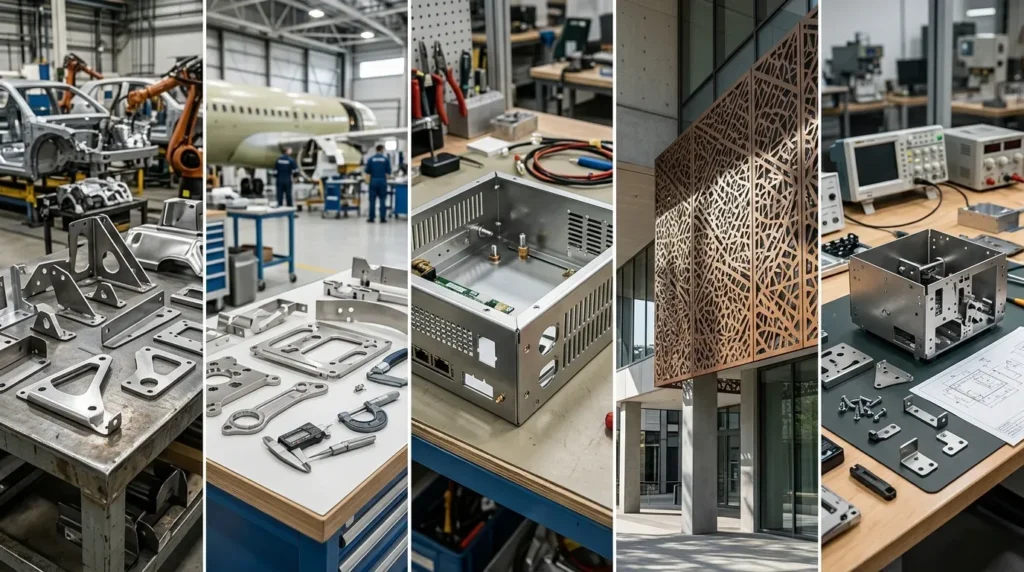
CNC laser cutting supports manufacturing across several industries. Its value depends on the ability to produce suitable profiles from digital designs while meeting material and quality requirements.
1. Automotive Manufacturing
Laser cutting is used for selected sheet metal panels, brackets, mounting plates, and other components. It supports prototype development and production operations where repeatable profiles are required.
2. Aerospace Manufacturing
Suitable laser processes support selected precision components and sheet metal parts. Aerospace applications require strict material traceability, inspection, and process qualification.
A laser-cut part is not automatically compliant simply because its dimensions are accurate. Material certification, inspection methods, and applicable industry requirements must also be considered.
3. Electronics and Electrical Enclosures
Manufacturers use laser cutting to produce enclosure panels, mounting plates, brackets, and control-panel components. Accurate holes and cutouts simplify the installation of switches, connectors, displays, and other hardware.
For products combining electronics and mechanical structures, laser-cut parts must fit the PCB, connectors, fasteners, and enclosure geometry. See our guide to electronics prototyping and product design.
4. Medical Equipment
Specialized laser processes are used for selected medical components and instruments. Material selection, cleanliness, dimensional control, and regulatory requirements are particularly important in this industry.
The manufacturing method must be validated against the product’s intended use. Precision alone does not replace material qualification or inspection.
5. Construction and Architecture
Laser cutting supports decorative metal panels, signage, architectural screens, brackets, and custom sheet metal features. Designers can create complex patterns directly from vector or CAD drawings.
The process is useful for repeatable decorative profiles. Material thickness, structural loading, corrosion resistance, and installation requirements still need consideration.
6. Product Development and Rapid Prototyping
Product developers use laser cutting to produce physical parts from digital designs. It can help test enclosure dimensions, mounting positions, assembly clearances, and component arrangements before larger production runs.
A prototype enclosure may require a front panel with display openings, button holes, ventilation slots, and mounting points. A laser-cut panel can help evaluate the layout before finalizing the design.
Laser cutting is one of several methods used during prototype development. The best method depends on the part’s geometry, material, function, and expected production volume.
Explore our prototype development company guide for a broader view of engineering and manufacturing methods used during product development.
7. Signage and Decorative Manufacturing
CO2 laser systems are widely used for suitable acrylic and wood signage applications. They support custom lettering, decorative panels, displays, and products requiring detailed profiles.
The machine and material must be selected according to the intended finish. Acrylic grade, sheet thickness, and cutting settings influence the final appearance.
Advantages of CNC Laser Cutting
CNC laser cutting offers several benefits when the material and application are suitable. Its main strengths are digital design flexibility, repeatable motion, and the ability to produce detailed profiles.
- Precision: Focused laser energy and controlled motion support accurate profiles.
- Complex geometry: Detailed shapes can be produced from CAD or vector designs.
- Repeatability: The same machine program can reproduce a component consistently.
- Automation: Programmed cutting reduces manual cutting operations.
- No conventional blade contact: The process does not require a mechanical cutting blade to contact the workpiece.
- Material utilization: Nesting can reduce unused sheet material.
- Design flexibility: Digital drawings can be updated without manufacturing a dedicated cutting die.
- Prototyping: Components can be produced directly from digital designs for evaluation.
These benefits depend on the machine, material, process settings, and quality requirements. They should be evaluated against the needs of the actual component.
Limitations of CNC Laser Cutting
Laser cutting is not the best solution for every manufacturing requirement. Some materials, geometries, and production conditions may be better suited to alternative processes.
- Initial investment: Industrial equipment can require substantial capital.
- Material restrictions: Some materials are unsuitable or hazardous to process.
- Thickness limitations: Maximum capacity depends on laser power, material, and machine design.
- Thermal effects: Heat can cause oxidation, distortion, or changes near the cut edge.
- Operating expenses: Electricity, gas, cooling, extraction, and consumables contribute to costs.
- Maintenance: Optics, nozzles, filters, and mechanical systems need regular inspection.
- Safety requirements: Laser radiation, fumes, fire, and electrical hazards require appropriate controls.
Compare laser cutting with alternatives such as CNC milling, plasma cutting, waterjet cutting, or mechanical shearing. The best method depends on the finished part rather than the machine alone.
CNC Laser Cutting vs. Other Cutting Technologies
Different manufacturing processes solve different problems. The right choice depends on material, thickness, tolerances, geometry, and production requirements.
| Feature | Laser Cutting | Plasma Cutting | Waterjet Cutting | CNC Milling |
|---|---|---|---|---|
| Process | Focused laser beam | Plasma arc | High-pressure waterjet | Rotating cutting tool |
| Thermal effect | Yes | Yes | No thermal cutting zone | Depends on operation |
| Typical use | Sheet profiles and detailed cuts | Conductive metal cutting | Broad material range | 3D features and machined parts |
| Tool contact | No conventional cutting-tool contact | No mechanical blade contact | No mechanical blade contact | Physical tool contact |
| Geometry | 2D profiles and selected 3D applications | Mainly profiles | Profiles and selected complex cuts | 2D and 3D machining |
| Main consideration | Material and thickness limits | Heat and edge quality | Operating cost and cutting speed | Tooling and machining time |
Laser Cutting vs. CNC Milling
Laser cutting is often suitable when a component mainly requires a two-dimensional profile. CNC milling is more appropriate when the part needs pockets, slots with controlled depth, threaded holes, or 3D surfaces.
Some products require both processes. A sheet metal component may be laser cut and then drilled, tapped, bent, or machined to produce the final assembly.
Laser Cutting vs. Waterjet Cutting
Waterjet cutting uses a high-pressure water stream, often with abrasive material, to cut a wide range of materials. It does not use thermal cutting in the same way as a laser.
This makes waterjet useful where heat-related effects are undesirable. The appropriate choice still depends on thickness, geometry, tolerance, production speed, and total job cost.
Laser Cutting vs. Plasma Cutting
Plasma cutting uses an electrically conductive gas to create a high-temperature plasma arc. It is commonly used for cutting electrically conductive metals.
Laser cutting is often selected when detailed profiles and narrower cutting features are required. Plasma may suit certain thicker metal applications, depending on machine capability and finish requirements.
How Much Does CNC Laser Cutting Cost?
CNC laser cutting costs depend on whether you are buying equipment or paying a manufacturer to cut your parts. These are separate purchasing decisions and should be evaluated independently.
CNC Laser Cutting Machine Price
A machine’s price depends on its technology, power, working area, automation, controller, and overall construction. The quoted price should include more than the laser source itself.
- Fiber, CO2, or diode laser technology and source power.
- Cutting bed dimensions and machine frame construction.
- CNC controller, software, and motion system.
- Cooling, assist gas, and extraction equipment.
- Installation, operator training, and technical support.
- Warranty coverage, spare parts, and consumables.
A desktop diode engraver and an industrial 3000 W fiber laser machine are not comparable products. They serve different materials, production requirements, and operating environments.
CNC Laser Cutting Machine Price in Pakistan
For buyers in Pakistan, the final purchase cost may also depend on import duties, exchange rates, shipping, installation, and local technical support.
Evaluate a 3000 W fiber laser quotation against its complete configuration. Compare the cutting area, supported materials, tested thickness capacity, controller, chiller, extraction, warranty, and spare-parts availability.
Avoid choosing equipment only because it has a higher advertised wattage. Check whether its specifications match your actual production requirements.
CNC Laser Cutting Service Cost
When outsourcing cutting work, suppliers may calculate charges using several factors. The final quotation may include machine processing, material handling, and additional finishing operations.
- Material type, grade, thickness, and sheet size.
- Total cutting length, number of piercings, and design complexity.
- Machine operating time, nesting efficiency, and assist gas requirements.
- Finishing, packaging, and delivery requirements.
A simple profile may require less processing time than a complex design containing many small holes and detailed contours. Quantity and material utilization also influence the final cost.
What Should You Send for an Accurate Quotation?
Provide the supplier with a DXF or other accepted design file, material type and grade, material thickness, required quantity, and critical dimensions.
Also specify required tolerances, edge finish, and any additional bending, welding, or finishing requirements. This information helps suppliers evaluate the job and reduce quotation changes.
How to Choose the Right CNC Laser Cutting Machine
The best CNC laser cutting machine is the one that matches your actual production requirements. Evaluate the following areas rather than relying on advertised power or price alone.
1. Identify Your Main Materials
Decide whether your work mainly involves sheet metal, acrylic, wood, or other approved materials. This is the first step in choosing between fiber and CO2 technology.
2. Define Material Thickness
List the materials and thicknesses you expect to process regularly. Check the manufacturer’s recommended cutting capacity rather than relying only on maximum advertised thickness.
3. Select Suitable Laser Power
Choose power based on production requirements, material thickness, and desired cutting speed. Higher power can increase investment and operating requirements without adding value to every workshop.
4. Evaluate the Working Area
Choose a cutting bed that accommodates typical sheet sizes and the largest expected components. Consider loading requirements and whether future production may increase.
5. Check Controller and Software Compatibility
Confirm which file formats, CAD/CAM workflows, and machine control software are supported. Also check whether the manufacturer provides software training and technical assistance.
6. Evaluate Operating Costs
Include electricity, assist gas, cooling, extraction filters, nozzles, protective optics, maintenance, and downtime. A lower purchase price does not always mean a lower total cost of ownership.
7. Check Service and Spare Parts
Ask about replacement parts, warranty coverage, local support, installation, and operator training. A machine that cannot be maintained locally may create expensive production interruptions.
8. Review Safety Systems
Check the enclosure, interlocks, emergency stop, extraction system, fire controls, and applicable laser safety requirements. Required controls depend on the machine classification and operating configuration.
Laser Cutting Safety and Maintenance
Laser cutting machines combine high-energy laser sources, hot materials, moving components, electrical systems, and potentially hazardous fumes. Safe operation requires suitable equipment, trained operators, and procedures specific to the machine and material.
Essential Laser Cutting Safety Practices
- Use the machine’s approved enclosure and safety systems.
- Never bypass door interlocks or protective devices.
- Provide suitable fume extraction and filtration.
- Identify every material before processing it.
- Review the material Safety Data Sheet where applicable.
- Keep combustible waste away from the cutting area.
- Follow the manufacturer’s fire response procedures.
- Train operators before allowing machine use.
- Never leave an operating laser cutter unattended.
PVC, vinyl, and other unsuitable materials can release hazardous emissions. Unknown plastics should never be processed simply because they appear similar to an approved material.
The University of Illinois laser cutter safety guidance provides examples of material hazards and operational precautions. Always follow the specific instructions for your machine and workplace.
Laser Safety Classifications
Class 1 and Class 4 describe different laser safety classifications. An enclosed machine may provide a lower accessible emission classification during normal operation, even when its internal laser source presents a higher hazard.
The complete machine classification and operating configuration determine the required controls. Operators should follow the manufacturer’s documentation and applicable safety standards.
Basic CNC Laser Machine Maintenance
Regular maintenance helps protect cutting quality and machine reliability. The inspection schedule should reflect operating hours, environmental conditions, and the equipment manufacturer’s recommendations.
Optical components: Inspect and clean optics according to manufacturer procedures.
Cutting nozzles: Check for damage, contamination, and wear.
Cooling system: Monitor coolant condition, temperature, and flow as specified by the manufacturer.
Air supply: Inspect compressors, dryers, filters, and pressure regulation.
Extraction system: Check filters, ducts, airflow, and waste collection.
Motion system: Inspect guides, drives, lubrication, and mechanical movement.
Electrical and safety systems: Check connections, emergency stops, and protective devices.
Frequently Asked Questions About CNC Laser Cutting
1. What is CNC laser cutting?
↑2. How does a CNC laser cutting machine work?
↓3. What is the difference between CNC and laser cutting?
↓4. Which laser is best for cutting metal?
↓5. Can a CO2 laser cut metal?
↓6. What materials can a laser cutting machine cut?
↓7. What file format should I export for laser cutting?
↓8. What is kerf in laser cutting?
↓9. How much does CNC laser cutting cost?
↓10. Can a laser cutter cut Coroplast?
↓11. Can PVC or vinyl be laser cut?
↓12. What is the full form of CNC?
↓13. Is CNC laser cutting suitable for rapid prototyping?
↓Conclusion
CNC laser cutting combines digital design, computer-controlled motion, and focused laser energy to manufacture components with repeatable profiles. It supports applications ranging from industrial sheet metal fabrication to custom product development.
Fiber lasers are widely used for industrial metal cutting, while CO2 systems support many non-metal applications. Diode and Nd:YAG systems serve different engraving and specialized processing requirements.
Successful manufacturing depends on more than laser power. Material compatibility, kerf compensation, assist gas, cutting speed, focus, software preparation, and inspection all influence the final result.
For engineers and product developers, laser cutting provides a practical way to turn digital designs into physical components. It can support enclosure development, sheet metal fabrication, prototype testing, and custom manufacturing.
The right process ultimately depends on material, geometry, dimensional requirements, production volume, and total manufacturing cost. Selecting the process early can help avoid unnecessary redesigns and manufacturing delays.